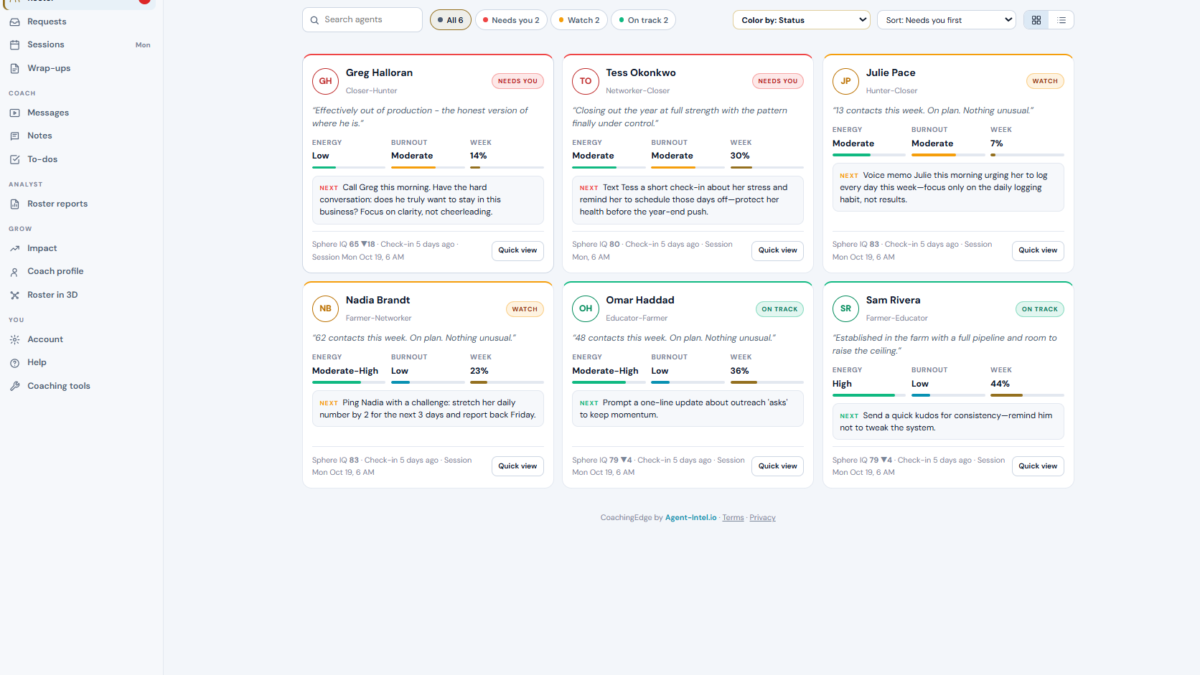
Real estate team management software should help you see what needs attention across your roster, and make the next coaching conversation more useful.
The right system connects meaningful activity, targets, follow-through, and agent wellbeing. It doesn’t just collect contacts or count calls. It helps you spot a gap early, prepare for a conversation, and check what changed afterward.
Here’s what to look for, what to ask vendors, and where CoachingEdge fits.
Why spreadsheets and memory stop scaling
A spreadsheet can track targets. Your CRM can show deals. A calendar can remind you about one-on-ones. But those tools don’t automatically give you one current view of who is on plan, who is slipping, and what happened after your last coaching session.
As your roster grows, the work shifts from coaching to preparation: gathering updates, checking activity, rereading notes, and deciding which agent needs you first. That costs time, and important signals can sit unnoticed between check-ins.
The issue isn’t that you need more data. You need a consistent way to read the data you already have and turn it into a clear next step. What should you address this morning?
What team management software does
“Real estate team management software” covers several different jobs. Before you compare products, decide which job is creating the most friction for you.
A brokerage operating system may manage contacts, leads, transactions, marketing, commissions, or compliance. A coaching platform focuses on agents’ progress, the quality of coaching sessions, and follow-through on commitments. Some platforms combine several functions; others specialize.
Don’t assume one category replaces another. If you already have a CRM that handles lead routing and transactions, you may need a coaching layer, not a second database. Write down the gaps before you book demos.
Features worth comparing
Roster visibility
You should be able to see the whole team without opening individual records one by one. Look for a roster view that helps you identify who is progressing, who needs a check-in, and why.
Ask vendors: Can I review the roster in one place? Can I see the underlying activity and recent check-in data behind a status? Can I open an agent’s record without losing the team-level picture?
Early-warning signals
A useful platform surfaces a change in behavior, not just a disappointing closing number. A stalled agent may need help with a missed commitment, activity that has fallen behind plan, or another issue that calls for a conversation. A flag is a prompt to investigate, not a verdict.
Ask how the software decides an agent is slipping. Which data does it use? How recent is that data? Can you distinguish a genuine change in pattern from missing or incomplete logging?
Prepared one-on-ones
Session prep should help you start with evidence, not spend the first part of the meeting reconstructing last week. Look for a briefing that puts recent activity, the last session’s commitments, and topics for discussion in front of you.

CoachingEdge prepares an AI session briefing before a one-on-one. Its Coach Session Brief includes a recap of the last session and follow-through, unfinished business, four numbered suggested topics, a conversation opener, a quick win, an “avoid today” note, and an archetype tip. The brief helps you prepare. You still lead the conversation.
Accountability you can review
A target is only useful if you can see whether an agent followed through. Compare tools for ways to connect a commitment to later activity and bring that history into the next conversation.
Ask what counts as follow-through, how you can review the record, and whether agents can see the information relevant to their own work. Clear visibility supports accountability without turning every meeting into a surprise audit.
Wellbeing alongside performance
Energy and stress can matter to sustained performance. A system that tracks pulse or wellness signals can help you notice a change and ask a better question. It should support your judgment, not diagnose an agent or replace a direct conversation.
Ask what is measured, how often agents provide input, and how the system presents the data. If an agent seems to be slipping, do you have enough context to ask what’s going on before prescribing more activity?
A practical vendor checklist
Use this list during demos. Ask vendors to show each item in the product, not just confirm it’s on a roadmap.
- Roster: Can you review the whole team in one place and identify who needs attention?
- Evidence: Can you trace a status or recommendation to real logged activity?
- Planning: Can you compare an agent’s plan with actual progress?
- Session prep: Does the system prepare a briefing before a one-on-one?
- Follow-through: Can you review commitments and unfinished business at the next session?
- Wellbeing: Does it track pulse or wellness in a practical, non-diagnostic way?
- Agent access: Are dashboards read-only, and can you explain what agents can see?
- Privacy and fit: Can you understand permissions, data handling, exports, and how the tool fits alongside your existing systems?
- Cost: What does the price include? Are setup fees, annual commitments, or extra seats involved?
For security and privacy questions, don’t rely on a vendor’s feature list alone. Review its policies and determine what your brokerage needs to meet its own obligations. The National Association of REALTORS® FAQ on the FTC Safeguards Rule is a useful starting point.
Where CoachingEdge fits
CoachingEdge is a coaching and roster-management platform for team leads, brokers, and coaches. It is not a replacement for every CRM or transaction system. Its focus is helping you monitor the roster, prepare for one-on-ones, and follow up with agents.
The platform reads real logged agent data, including daily activity, wellness and pulse, and plan versus actual progress. A whole-roster brief arrives before 8 AM and flags agents who are stalling or slipping. You can then review read-only agent dashboards and prepare for individual sessions.

Each session includes before-and-after pulse tracking. CoachingEdge also supports notes and video messages for follow-up between sessions. That gives you a record of how the agent was doing before the conversation and what they report afterward. Useful context for your next check-in.
The software prepares and organizes the work. You still bring judgment, ask direct questions, and agree on the next commitment. If you want a platform to automate your whole brokerage, verify those requirements separately. If your main gap is coaching visibility and session preparation, ask to see those workflows.
Pricing
CoachingEdge starts at $354 per month for a lead plus five agents. The next listed package is $590 per month for a lead plus ten agents. The company lists no setup fee and no annual contract.
Compare the package against your real roster and the tools you already pay for. Ask what’s included, how a larger roster is priced, and what happens if your needs change. You can review the current details on the CoachingEdge page.
Choose for the coaching work you need to do
The best real estate team management software is the one that makes your next action clearer. Start with your operational gap: lead and transaction management, roster visibility, or consistent coaching preparation. Then test whether the product shows the evidence behind its recommendations.
If you lead a team, don’t leave the demo with a feature list. Bring a real, anonymized example: an agent who is on plan, one who is slipping, and a recent coaching commitment. Ask the vendor to show what you would see before the next one-on-one. Then decide whether that view helps you coach with more focus.